How to Tune a CB Antenna for Low SWR
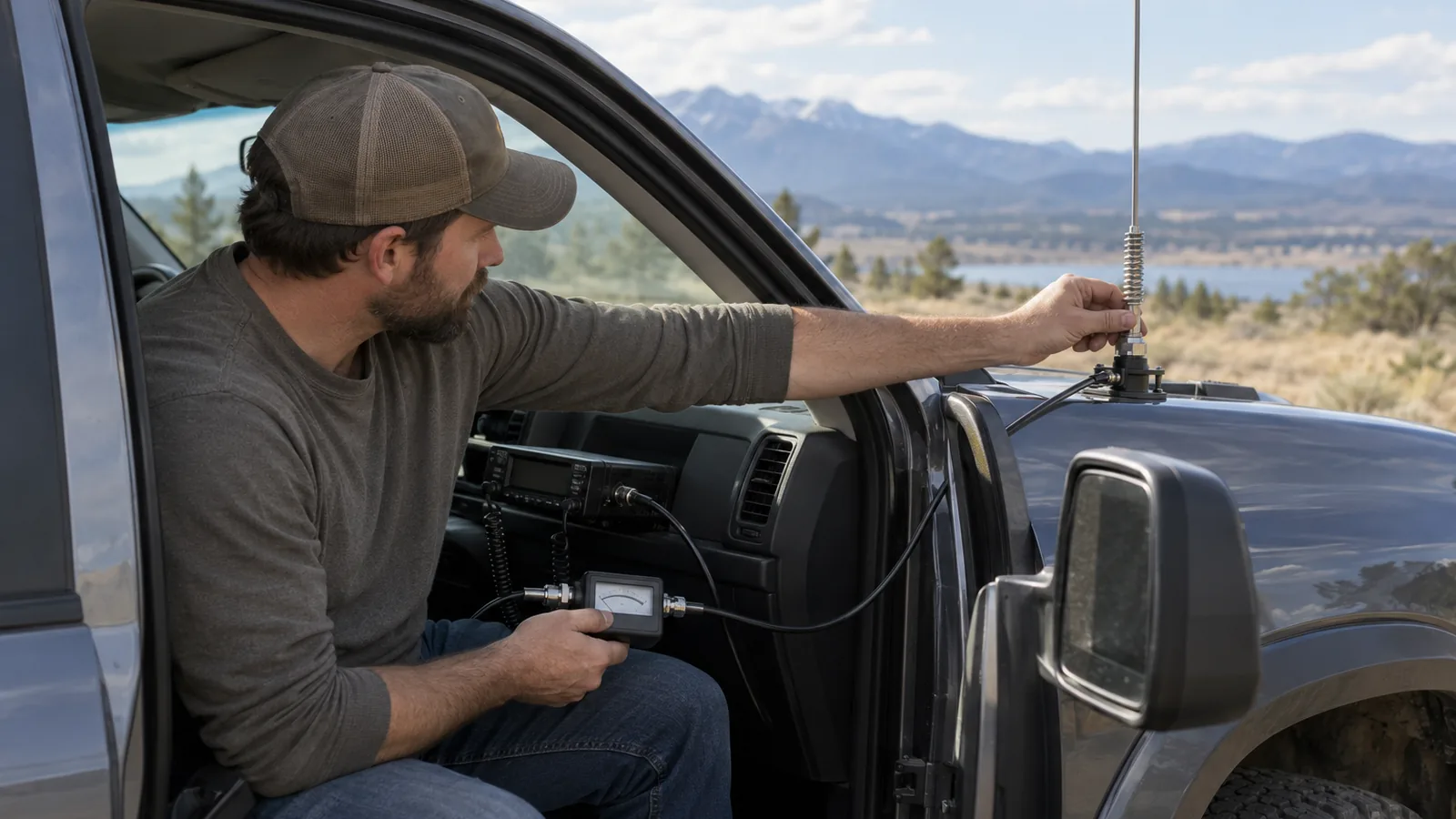
To learn how to tune a CB antenna, connect an inline SWR meter and measure channels 1 and 40, then make a small antenna-length adjustment and retest. Aim for below 2:1 on channels 1, 20, and 40. Which way to adjust depends on which channel reads higher; follow your meter’s procedure, since its controls can vary.
Quick answer
How do you tune a CB antenna?
Use an inline SWR meter to measure channels 1, 20, and 40, aiming for readings below 2:1 on all three. Compare channels 1 and 40: if channel 1 is higher, lengthen the adjustable antenna element; if channel 40 is higher, shorten it. Make small changes and retest; the adjustment applies only to antennas with an adjustable length or element.
- Test outdoors at least 20 ft (6.1 m) from trees and buildings, with vehicle doors, hood, and trunk closed.
- With the radio off, connect it to the meter’s TX/RADIO port and the antenna coax to its ANT port using a short jumper cable.
- On each test channel, set the meter to FWD/CAL, briefly key the microphone, adjust CAL to SET, then switch to REF/SWR and read the result.
- Check channels 1, 20, and 40; recalibrate separately on channels 1 and 40.
- Adjust the antenna in small increments based on the channel 1 and 40 readings, then retest all three channels.
- Stop testing if the meter pegs or the reading is extremely high; don’t transmit with the antenna disconnected.
Tune the antenna in numbered steps
Use the meter’s own calibration procedure, then work through the numbered steps in order. Make small antenna adjustments and retest both ends of the band after each change.
| Channel | Source |
|---|---|
| 1 | firestik.com walcottradio.com |
| 20 | firestik.com walcottradio.com |
| 40 | firestik.com walcottradio.com |
Park in a clear area. Test outdoors at least 20 ft (6.1 m) from trees and buildings, with the doors, hood, and trunk closed and the antenna clear of nearby objects.
Install the antenna and route its coax. Keep the antenna mounted and connected, since nearby objects and changes to the vehicle’s position can affect readings.
Connect the meter with the radio off. Use a short jumper cable from the radio to the meter’s TX/RADIO port, then connect the antenna coax to its ANT port.
Calibrate for channel 1. Set the meter to FWD/CAL, briefly key the microphone, and adjust CAL to the SET mark; switch to REF/SWR and read the result.
Repeat the calibration and reading on channels 20 and 40. Calibrate separately on each channel, using the same FWD/CAL and REF/SWR procedure. If the meter’s labels or operation differ, use its instructions for that meter.
Compare the readings on channels 1 and 40. If channel 1 reads higher, lengthen the antenna or its adjustable element in a small increment; if channel 40 reads higher, shorten it in a small increment.
Retest all three channels after each adjustment. A practical target is below 2:1 on channels 1, 20, and 40. If the meter pegs or the reading is extremely high, stop testing and troubleshoot before transmitting again.
Reconnect the coax directly to the radio and verify. Do not transmit with the antenna disconnected.
Set up the meter and compare channels
Place the SWR meter between the radio and antenna, calibrate it for each channel if the meter supports calibration, then compare readings on channels 1 and 40.
Use a short jumper cable between the radio and meter. If your meter uses different labels or a different connection procedure, follow its instructions.
Switch to REF/SWR to read the result.
Note
Measurement steps and recommended conditions can vary by meter and radio. Use the meter’s own procedure if it differs from the general connection and calibration steps here.
Adjust antenna length from the readings
Use the channel 1 and channel 40 SWR readings to decide whether to lengthen or shorten an adjustable antenna, then make a small change and retest. If channel 1 SWR is higher, the antenna system reads electrically short, so lengthen the antenna or its adjustable element in small increments.
If channel 40 SWR is higher, the antenna system reads electrically long, so shorten the antenna or its adjustable element in small increments. These readings show the direction to adjust; they don’t specify a universal adjustment size, so avoid large changes and compare the readings again after each one.
If channel 1 remains higher, add a little length; if channel 40 remains higher, remove a little length. If the end-channel readings move closer together and channel 20 is near the low point, the adjustment is moving the antenna system toward a match across the band.
The adjustment method depends on the antenna: some let you change the antenna’s length, while others use an adjustable element. A persistently short reading can also point to an inadequate ground plane, so don’t keep shortening or lengthening the antenna without checking the installation if adjustments don’t improve the readings.
Check the installation if SWR stays high
If antenna adjustments don’t lower SWR, inspect the installation before changing its length again. Check the coax path and connections first, then the mount and ground, and finally nearby objects that may affect the reading.
- Coax: Look for damaged or incorrect coax and loose, faulty, or shorted connectors; any of these can keep SWR high across channels.
- Mount and ground: Check that the antenna stud and mount are installed correctly and aren’t shorted, then confirm the mount has a solid chassis connection if the antenna depends on the vehicle’s ground plane.
- Nearby objects: Move away from buildings, metal objects, and other vehicles, and keep the vehicle’s doors, hood, and trunk closed while measuring, since nearby objects and open panels can change readings.
After each repair or change, measure again under the same conditions. If channel 1 and channel 40 remain high across the band, that pattern points toward an installation fault, such as a coax or mount problem, rather than a simple antenna-length adjustment.
Treat SWR above 3:1 across the band as a warning to stop transmitting and find the fault before using the radio. High SWR reflects more power instead of delivering it to the antenna, and sustained high readings can risk damage to the transmitter’s output circuitry.
Listening for a stronger signal or asking another operator for a signal report won’t confirm SWR or show reliably whether it’s safe to transmit.
Frequently Asked Questions
Can I tune a CB antenna without an SWR meter?
A suitable antenna analyzer can measure the antenna system without transmitting with your CB radio. Listening for signal strength or asking another operator for a report won’t measure SWR or confirm that the system is safe to use. A second radio offers only a rough comparison, so verify the match with an SWR meter or analyzer.
How do I tune a CB antenna without transmitting?
An antenna analyzer suitable for your CB band and antenna system can measure the match without transmitting with the CB radio. If you use an inline SWR meter instead, measuring requires briefly keying the microphone on each test channel, so don’t transmit with the antenna disconnected.
Does antenna height affect CB SWR readings?
Yes, nearby objects can affect SWR, so take readings outdoors in an open area at least 20 ft (6.1 m) from trees and buildings, with the antenna clear of objects. Keep the vehicle doors, hood, and trunk closed while measuring, since changes to those panels can also alter readings.
Can I use a handheld CB radio to tune a vehicle antenna?
A handheld radio alone can’t directly measure the vehicle antenna’s SWR; use an SWR meter or a suitable antenna analyzer to verify the match. For an inline meter, connect the radio to its TX/RADIO port and the antenna coax to its ANT port, then calibrate and read SWR on the test channels.
How often should I check my CB antenna’s SWR?
Check SWR after installing or adjusting the antenna, and again if readings or radio operation suggest a problem; retest after repairs or installation changes under the same conditions. If readings are above 3:1 across the band, stop transmitting and troubleshoot before using the radio.
Conclusion
If your readings point to an antenna-length adjustment, change the adjustable element a little and retest. If they stay high across the band, stop adjusting and inspect the coax, mount, and ground before transmitting again.
Your next step is to measure channels 1, 20, and 40 under the same conditions, then make one small change at a time.
Sources
- firestik.com (firestik.com)
- firestik.com (firestik.com)
- walcottradio.com (walcottradio.com)
- How to Check the SWR Meter on your Cobra CB Radio (support.cobra.com)
- firestik.com (firestik.com)
- firestik.com (firestik.com)
- cbradiosupply.com (cbradiosupply.com)
- profoundcb.com (profoundcb.com)
- strykerradios.com (strykerradios.com)